SubmenuButton
Examples#
Basic Example#
import flet as ft


def main(page: ft.Page):
    page.padding = 0
    page.spacing = 0

    def handle_color_click(e: ft.Event[ft.MenuItemButton]):
        color = e.control.content.value
        background_container.content.value = f"{color} background color"
        background_container.bgcolor = color.lower()
        page.update()

    def handle_alignment_click(e: ft.Event[ft.MenuItemButton]):
        print(
            f"bg_container.alignment: {bg_container.alignment}, bg_container.content: {bg_container.content}"
        )
        background_container.alignment = e.control.data
        print(
            f"e.control.content.value: {e.control.content.value}, e.control.data: {e.control.data}"
        )
        page.update()

    def handle_on_hover(e: ft.Event[ft.MenuItemButton]):
        print(f"{e.control.content.value}.on_hover")

    bg_container = ft.Container(
        expand=True,
        bgcolor=ft.Colors.SURFACE_TINT,
        alignment=ft.Alignment.CENTER,
        content=ft.Text(
            value="Choose a bgcolor from the menu",
            style=ft.TextStyle(size=24, weight=ft.FontWeight.BOLD),
        ),
    )
    menubar = ft.MenuBar(
        expand=True,
        controls=[
            ft.SubmenuButton(
                content=ft.Text("Change Body"),
                controls=[
                    ft.SubmenuButton(
                        content=ft.Text("BG Color"),
                        leading=ft.Icon(ft.Icons.COLORIZE),
                        controls=[
                            ft.MenuItemButton(
                                content=ft.Text("Blue"),
                                on_click=handle_color_click,
                                on_hover=handle_on_hover,
                                style=ft.ButtonStyle(
                                    bgcolor={ft.ControlState.HOVERED: ft.Colors.BLUE}
                                ),
                            ),
                            ft.MenuItemButton(
                                content=ft.Text("Green"),
                                on_click=handle_color_click,
                                on_hover=handle_on_hover,
                                style=ft.ButtonStyle(
                                    bgcolor={ft.ControlState.HOVERED: ft.Colors.GREEN}
                                ),
                            ),
                            ft.MenuItemButton(
                                content=ft.Text("Red"),
                                on_click=handle_color_click,
                                on_hover=handle_on_hover,
                                style=ft.ButtonStyle(
                                    bgcolor={ft.ControlState.HOVERED: ft.Colors.RED}
                                ),
                            ),
                        ],
                    ),
                    ft.SubmenuButton(
                        content=ft.Text("Text alignment"),
                        leading=ft.Icon(ft.Icons.LOCATION_PIN),
                        controls=[
                            ft.MenuItemButton(
                                content=ft.Text("bottom_center"),
                                data=ft.Alignment.BOTTOM_CENTER,
                                on_click=handle_alignment_click,
                                style=ft.ButtonStyle(
                                    bgcolor={
                                        ft.ControlState.HOVERED: ft.Colors.GREY_100
                                    }
                                ),
                            ),
                            ft.MenuItemButton(
                                content=ft.Text("bottom_left"),
                                data=ft.Alignment.BOTTOM_LEFT,
                                on_click=handle_alignment_click,
                                style=ft.ButtonStyle(
                                    bgcolor={
                                        ft.ControlState.HOVERED: ft.Colors.GREY_100
                                    }
                                ),
                            ),
                            ft.MenuItemButton(
                                content=ft.Text("top_center"),
                                data=ft.Alignment.TOP_CENTER,
                                on_click=handle_alignment_click,
                                style=ft.ButtonStyle(
                                    bgcolor={
                                        ft.ControlState.HOVERED: ft.Colors.GREY_100
                                    }
                                ),
                            ),
                            ft.MenuItemButton(
                                content=ft.Text("center_left"),
                                data=ft.Alignment.CENTER_LEFT,
                                on_click=handle_alignment_click,
                                style=ft.ButtonStyle(
                                    bgcolor={
                                        ft.ControlState.HOVERED: ft.Colors.GREY_100
                                    }
                                ),
                            ),
                            ft.MenuItemButton(
                                content=ft.Text("center_right"),
                                data=ft.Alignment.CENTER_RIGHT,
                                on_click=handle_alignment_click,
                                style=ft.ButtonStyle(
                                    bgcolor={
                                        ft.ControlState.HOVERED: ft.Colors.GREY_100
                                    }
                                ),
                            ),
                        ],
                    ),
                ],
            )
        ],
    )

    page.add(
        ft.Row(controls=[menubar]),
        background_container := ft.Container(
            expand=True,
            bgcolor=ft.Colors.SURFACE_TINT,
            alignment=ft.Alignment.CENTER,
            content=ft.Text(
                value="Choose a bgcolor from the menu",
                style=ft.TextStyle(size=24, weight=ft.FontWeight.BOLD),
            ),
        ),
    )


ft.run(main)
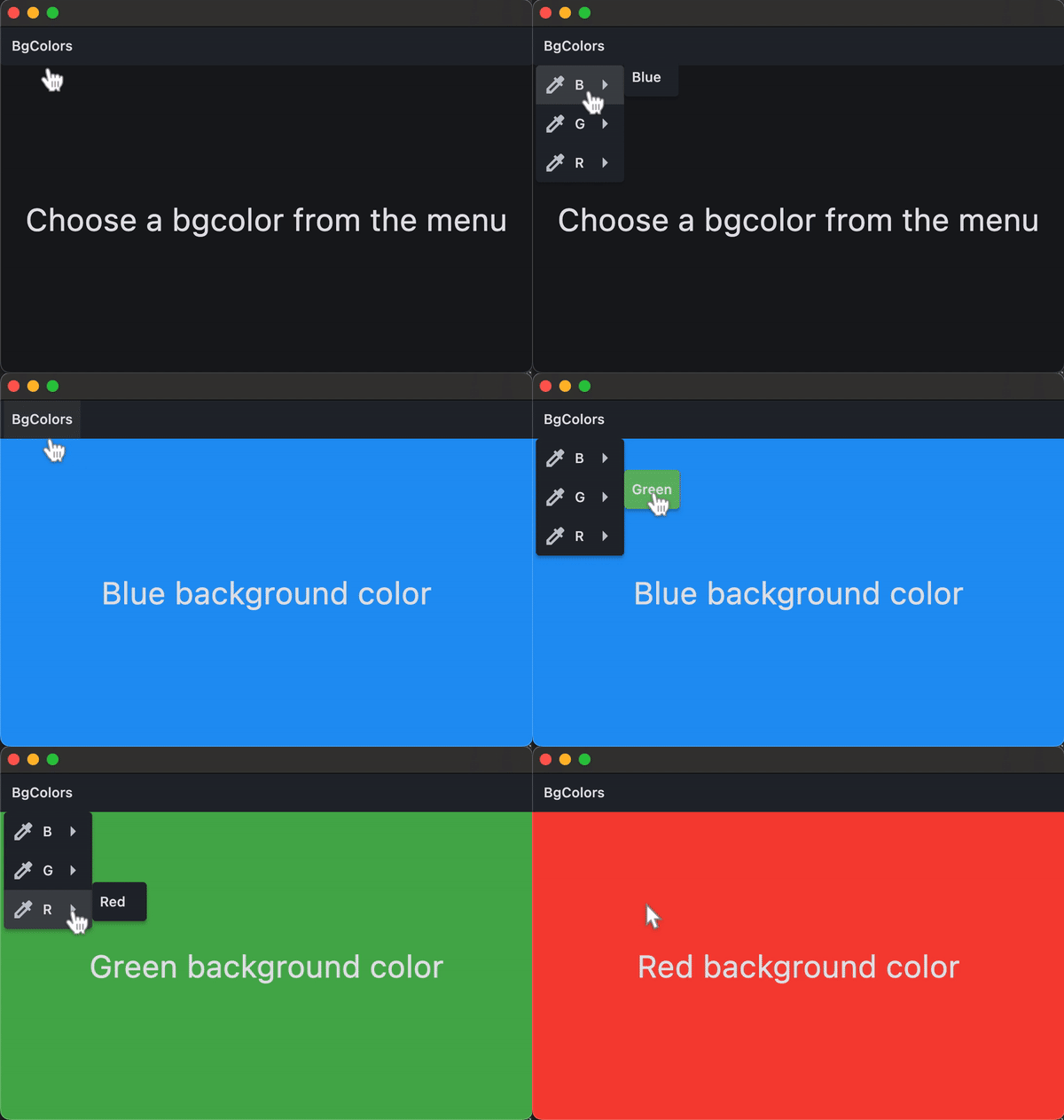
Bases: LayoutControl
A menu button that displays a cascading menu.
Typically used in a MenuBar control.
alignment_offset: OffsetValue | None = None
The offset of the menu relative to the alignment origin determined by
MenuStyle.alignment on the
style attribute.
clip_behavior: ClipBehavior = HARD_EDGE
Whether to clip the content of this control or not.
content: StrOrControl | None = None
The child control to be displayed in the middle portion of this button.
Typically this is the button's label, using a Text control.
A list of controls that appear in the menu when it is opened.
Typically either MenuItemButton or
SubMenuButton controls.
If this list is empty, then the button for this menu item will be disabled.
on_blur: ControlEventHandler[SubmenuButton] | None = None
Called when this button loses focus.
on_close: ControlEventHandler[SubmenuButton] | None = None
Called when the menu is closed.
on_focus: ControlEventHandler[SubmenuButton] | None = None
Called when the button receives focus.
on_hover: ControlEventHandler[SubmenuButton] | None = None
Called when the button is hovered.